Equip your JavaBeans to exchange data
without knowing beans about each other
The InfoBus is a public specification of dynamic data-sharing technology that enables developers to equip their JavaBean components to communicate with other JavaBean components. InfoBus was jointly designed by Lotus Development Corporation and Sun Microsystems' JavaSoft division; the final release 1.1 specification, the release candidate for InfoBus 1.1, and other information about InfoBus can be found at http://www.javasoft.com/beans/infobus. InfoBus 1.1, which supports applications designed for either JDK 1.1 and 1.2, will be released soon; watch the web page for more news.
Components that make up an InfoBus application can be classified in three types:
Data producers: Components that respond to requests for data from consumers.Data consumers: Components interested in hearing about any new data sets that enters the environment. Data controllers: The InfoBus traffic cop. A data controller is an optional component that regulates or redirects the flow of events between data producers and consumers. A data controller is not required for the application described here.

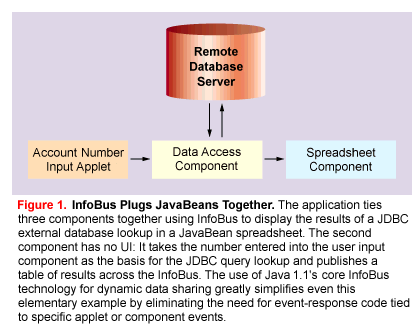
The spreadsheet in this example acts as a data consumer: It looks for information published by the DAC and displays it on the screen, as shown in Figure 3. The application designer did not have to write the spreadsheet, of course: It is a commercially available Java applet designed specifically to talk to the other applications via the InfoBus. The sheet responds to change events fromt he DAC to display the results of each query.
From the point of view of the InfoBus architecture, the application architecture looks a bit different. Note that the InfoBus is similar to a hardware bus; the three applets are all plugged into the same bus, as peers shown in Figure 2. In principle, all applets can see the events generated by all other applets; it is up to the application designer to control which data items will be produced or consumed by each applet. InfoBus-connected applets must all live in the same Java Virtual Machine, but that doesn't mean InfoBus can't participate in distributed applications. In our example, the DAC has a connection to a remote data source and uses JDBC to query it.
Overview of the InfoBus Process for
Data Exchange
The InfoBus supports a stylized protocol for data
exchange between InfoBus components consisting of the
following major elements:
Membership.
Any Java class can join the InfoBus if it implements the InfoBusMember
interface. The membership process connects applets
to an InfoBus instnace in preparation for data exchange.
Rendezvous. An InfoBus application
supplies an object that implements InfoBusDataProducer
or InfoBusDataConsumer interfaces (or both)
to listen for events appropriate to a component's role as
a producer or consumer. A producer can also announce the
availability of information to all listeners. When a
producer gets a request event for information it can
supply, it creates an instance of a data item and
provides it to the requesting consumer. The consumer can
request a particular item by name or ask for a data item
in reaction to a producer's announcement of its
availability.
Data access.InfoBus
specifies a number of standard interfaces to provide
direct data transfer between a producer and consumer. The
interfaces include ImmediateAccess, which
provides an InfoBus wrapper for a simple data item; ArrayAccess,
which provides access functions for an array with
arbitrary dimensions; and RowsetAccess,
which provides a row and column interface to support
database solutions. In addition to these, InfoBus
applications can also use the standard Java collection
interfaces defined in JDK 1.2 (see http://java.sun.com/products/jdk/1.2/docs/guide/collections/) for structured data exchange.
Change notification. When
a consumer has received a data item from a producer, it
can request notifications of all changes to the data by
registering a DataItemChangeListener on the
data item. As the producer detects changes, either
because of changes in the external data source or because
of modifications made by consumers, it will announce the
changes to all listeners.
Let's consider how each of these plays a role in the employee ID input applet.
Implementing InfoBusMember
to Get on the Bus
For our sample application, our first need is to connect
our components to the InfoBus. Our main application
class, SimpleDataProducer, implements the
required InfoBusMember interface. The
methods required by InfoBusMember are
designed to support an InfoBus property and
listeners for changes to the property. An
InfoBusMemberSupport class is available that encapsulates
the required functionality, and the SimpleDataProducer
uses -- this by creating an instance of InfoBusMemberSupport
and delegating all methods to that class.
The following code indicates that EmployeeIDInput
implements InfoBusMember (as well as other
interfaces, explained later) in this manner. It declares
member data that holds a reference to the InfoBusMemberSupport
instance, and it defines each method required for InfoBusMember,
delegating the work to the support instance. In the code
snippet, we show only one method implementation; the
implementation of the other methods is similar.
public class EmployeeIDInput extends
Applet implements InfoBusMember,
InfoBusDataProducer, ActionListener
{

   // use an InfoBusMemberSupport to hold
   // our InfoBus
   private InfoBusMemberSupport
m_IBHolder;

   // put the String to be published in a
   // SimpleDataItem
   private SimpleDataItem
m_data;

   // the name of the InfoBus to which we
   // connect
   private String
m_busName = null;

   // the name we use to publish our data
   private String
m_dataName;

   // following used to synchronize
   // Available and Revoke events
   private Object
m_AvailRevokeInterlock = new Object();

   // Delegate all calls to our
   // InfoBusMemberSupport
   // object, m_IBHolder

   public InfoBus getInfoBus()
   {
      return m_IBHolder.getInfoBus();
   }

   // other InfoBusMember calls are
   // delegated in the same fashion.
The InfoBusMemberSupport
instance must be created before any calls are delegated
to it, of course. In this example we do this work in the
applet's init() method, after calling Applet.init():
public void init()
   {
      super.init();

      // the "this" in the following
       // constructor tells the
      // support to use this object in the
      // source field of all events
      // it issues.
   m_IBHolder = new InfoBusMemberSupport
( this );
init(\040) also sets
up a property change listener so we know when our own
InfoBus property has changed. This is important for
creating reusable components; a Java Bean will typically
have its InfoBus set by its Bean container.
m_IBHolder.addInfoBusPropertyListener (
this );
The "default InfoBus" can
be used for communication between applets on the same
browser page. A default InfoBus is one whose name is
created from the DOCBASE provided by
applets. Alternatively, an applet or Bean can have the
name of the InfoBus it should join specified externally.
It is good practice to allow the application designer to
specify the name of the InfoBus to use. In the code
below, the supplied name is used if an InfoBusName parameter
is found, otherwise the default InfoBus is used.
m_busName = getParameter("InfoBusName"); /
/ leave null if not there
Similarly, a data-item name should be configurable. Data-item names are used in the rendezvous; in our example the producer will offer the employee ID input as a named data item. The code below gets the data-item name and saves it for later.
m_dataName = getParameter("DataItemName");

      if ( m_dataName == null )
      {
         m_dataName = "EmployeeID";
      }
Notice that InfoBusMemberSupport
also provides a convenient, high-level method that can be
called to join either a named or default InfoBus. The start()
method is a good place to call it. InfoBusMemberSupport.leaveInfoBus()
can be called in the stop() method. joinInfoBus
can throw an exception; these statements are inside a try...catch
block in the source file.
if ( m_busName != null )
   {    // gets a named bus using the busName string
      m_IBHolder.joinInfoBus ( m_busName );
   }
      else
   {    //gets default bus for this applet
       m_IBHolder.joinInfoBus( this );
   }
In the InfoBus model, the rendezvous is asynchronous. Data producers announce the availability of new data as it becomes ready at, say, completion of a URL read or completion of a calculation. Data consumers solicit data from producers as they require that data (at applet initialization, redraw, and so on.)
EmployeeIDInput
listens for requests for data and announces the
availability of data by implementing an InfoBusDataProducer
listener object and adding it to the list of listeners on
the InfoBus it joined. For simplicity, our example shows
this interface implemented on the main applet class; in a
real-world application, we recommend that the listener
object be separate from the main class to prevent
unwanted introspection, since the listener reference can
be obtained by any other InfoBus component on the same
bus.
InfoBusDataProducer
defines only one method, which is called each time a
consumer on the same bus requests data by name. Our
producer compares the requested data name to the name
received from a parameter and sets the data item if they
match.
| Infobus Interface Definitions |
|---|
| InfoBusMember
is an interface implemented by a Java class in
order to become a member of the InfoBus. Its
primary purpose is to manage the InfoBus
property, which keeps a reference to the InfoBus
instance the member has joined. InfoBusMember
also allows an external entity (for example, a
bean container) to set the InfoBus it wants a
member to talk to, so that a Bean Builder can
control the communication between its Beans. InfoBusDataProducer is an event listener implemented by data producers to receive request events from consumers. InfoBusDataConsumer is an event listener implemented by data consumers to receive events indicating the availability and revocation of items of fered by producers. DataItem is an interface that provides methods used for learning about a data item. Consumers can discover MIME-type information, get a reference to the producer's event listener, or ask for the value associated with a property string. DataItemChangeManager is the interface that provides methods used by a consumer to add or remove a change listener. A producer implements DataItemChangeManager on all data items for which it is willing to provide change notification to listeners. DataItemChangeListener A consumer implements this interface and registers the object with the producer's DataItemChangeManager to be informed of changes that occur on a data item. ImmediateAccess is implemented by a DataItem that needs to retrieve data values directly from calls to methods on this interface. You can get an immediate rendering of the data as a String or Object. A method can be used to change the value or throw an exception for read-only items. ArrayAccess is implemented by data items that are collections of DataItems organized in an n-dimensional array. The ArrayAccess interface includes methods to determine dimensions, obtain individual elements of the data set, iterate over all elements in the set, and subdivide oneArrayAccess object into two (e.g., to divide a data set of 2 columns and 5 rows into two data sets of 1 column and 5 rows). RowsetAccess is an interface for data items that are collections of rows obtained from a data source such as a relational database server. The RowsetAccess interface contains methods to discover the number of columns as well as their names and data types, to get the next row, to obtain column values, and to insert, update and delete rows. DbAccess is a database interface that allows the data consumer to is sue retrieval and non-retrieval queries and to optionally have the result announced as a DataItem. InfoBus applications can exchange information using any of the access interfaces described below. The JDK 1.2 Collection interfaces can also be used for accessing structured information in a standard, application-independent fashion. These interfaces are described in http://java.sun.com/products/jdk/1.2/docs/guide/collections/. |
